



Купить читEvicted AI Aimbotдля RUST
 1 / 7
1 / 7Тарифы
- Мгновенная выдача ключа
- Замена или заморозка при обновлении
- Инструкция и поддержка
- Оплата через Digiseller
Evicted AI Aimbot — революционный приватный софт на основе искусственного интеллекта и компьютерного зрения (YOLOv5) для абсолютного доминирования в Rust и любых других шутерах. В отличие от классических читов, Evicted не взаимодействует с памятью игры, что делает его полностью невидимым для античитов. Работает на аппаратном уровне и подходит для CS2 (включая FACEIT), Valorant, PUBG, Apex Legends, Warzone, Fortnite, Rainbow Six Siege, Roblox и других игр. Покупайте Evicted AI Aimbot в проверенном магазине Industries Cheat и получите универсальное технологическое преимущество в каждом матче.
Модули и настройки
Нажмите на модуль, чтобы раскрыть список настроек
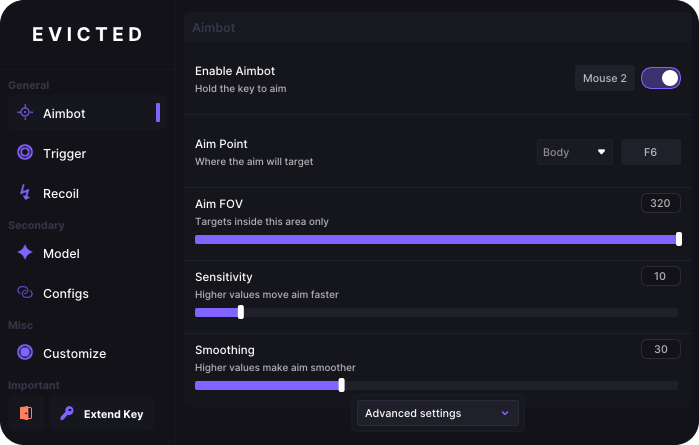
- ▸ Advanced Settings - Opens additional aimbot customization options.
- ▸ Aim FOV - Sets the area around the crosshair where the aimbot can detect enemies.
- ▸ Aim Point - Selects the body part the aimbot should target, such as the head or body.
- ▸Enable Aimbot (ON/OFF) - Enables automatic aiming. Hold the selected key, and the crosshair will follow the enemy.
- ▸ Horizontal Reduction - Reduces horizontal aiming assistance.
- ▸ Humanization - Adds small natural variations to make aiming look less robotic.
- ▸ Lead Strength - Controls how far ahead of a moving enemy the aimbot should aim.
- ▸ Prediction (ON/OFF) - Predicts enemy movement and aims slightly ahead of the target.
- ▸ Reaction Time - Adds a delay before aiming begins to imitate human reaction time.
- ▸ Sensitivity - Controls how quickly the crosshair moves toward the enemy.
- ▸ Smoothing - Makes the aiming movement softer and more natural.
- ▸ Smooth Type - Selects how the crosshair accelerates and slows down during aiming.
- ▸ Target Switch Delay - Adds a short pause before switching to another enemy.
- ▸ Vertical Reduction - Reduces vertical aiming assistance.
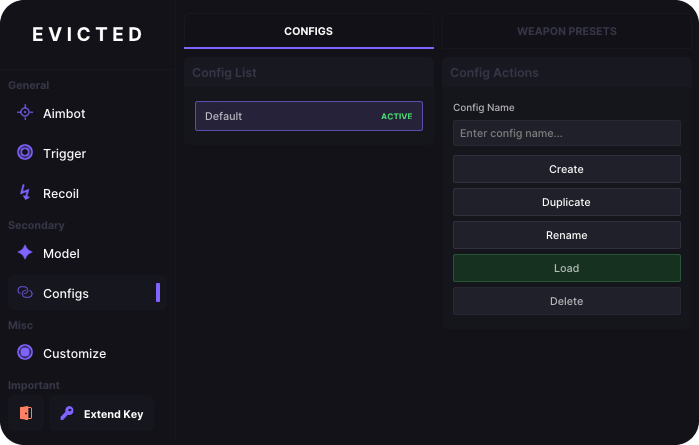
- ▸ Config List - Displays all saved configuration profiles.
- ▸ Config Name - Provides a field for entering the name of a new configuration.
- ▸ Create Config - Creates a new configuration profile.
- ▸ Delete Config - Permanently deletes the selected configuration.
- ▸ Duplicate Config - Creates a copy of the selected configuration with all its settings.
- ▸ Load Config - Applies all settings from the selected configuration.
- ▸ Rename Config - Changes the name of the selected configuration.
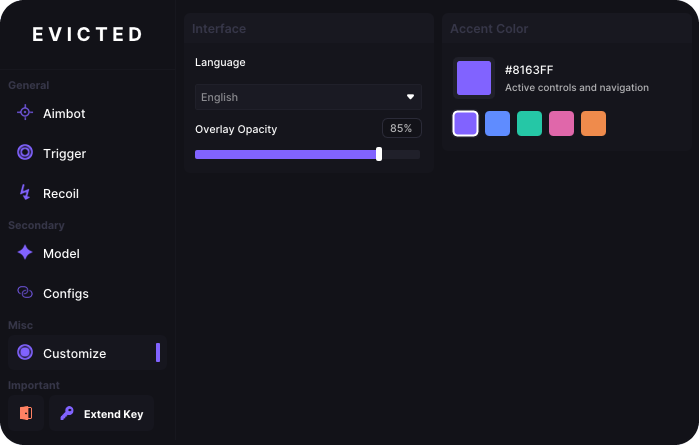
- ▸ Accent Color - Changes the color of active buttons, sliders, and navigation elements.
- ▸ Accent Color Presets - Allows you to quickly select one of the available colors.
- ▸ Custom Accent Color - Allows you to manually enter a custom interface color.
- ▸ Language - Changes the application interface language.
- ▸ Overlay Opacity - Controls how transparent or visible the overlay will be.
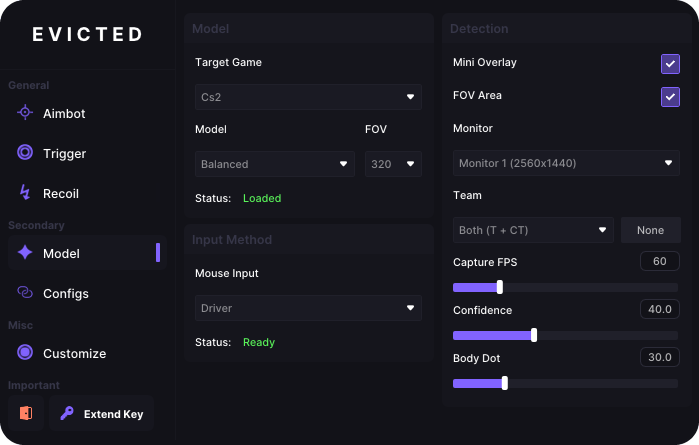
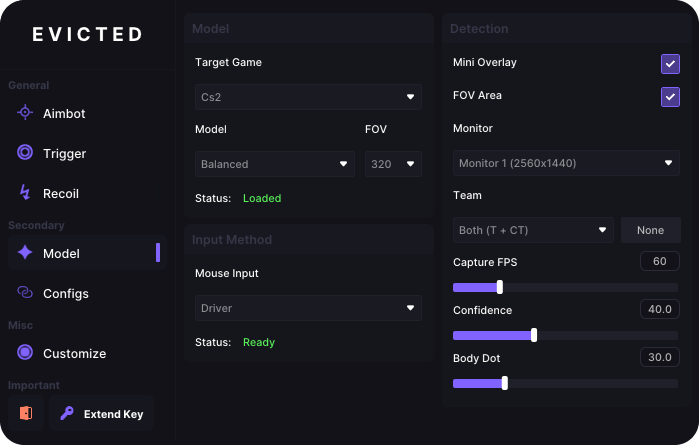
- ▸ Body Dot - Adjusts the body point used for detection or aiming.
- ▸ Capture FPS - Controls how many screen frames are analyzed each second.
- ▸ Confidence - Sets how confident the model must be before accepting an object as an enemy.
- ▸ FOV - Sets the size of the screen area scanned for enemies.
- ▸ FOV Area (ON/OFF) - Displays the boundaries of the enemy detection area.
- ▸ Mini Overlay (ON/OFF) - Displays a small overlay with basic information.
- ▸ Model - Selects an enemy detection model focused on speed, accuracy, or balance.
- ▸ Monitor - Selects the monitor that should be captured and analyzed.
- ▸ Mouse Input - Selects how movement commands are sent to the mouse.
- ▸ Target Game - Selects the game the detection system should work with.
- ▸ Team - Selects which teams should be detected.
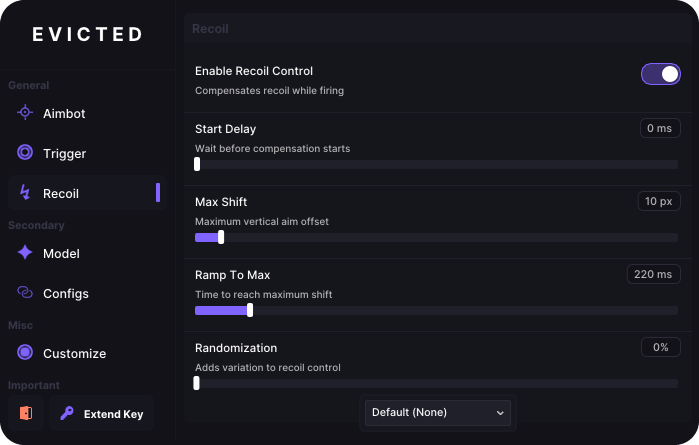
- ▸ Enable Recoil Control (ON/OFF) - Automatically compensates for vertical and horizontal weapon recoil.
- ▸ Max Shift - Limits how far the crosshair can move to compensate for recoil.
- ▸ Ramp To Max - Controls how quickly recoil compensation reaches maximum strength.
- ▸ Randomization - Adds small variations to recoil control movements.
- ▸ Recoil Preset - Selects a saved recoil profile for a specific weapon.
- ▸ Start Delay - Sets the delay before recoil compensation begins.
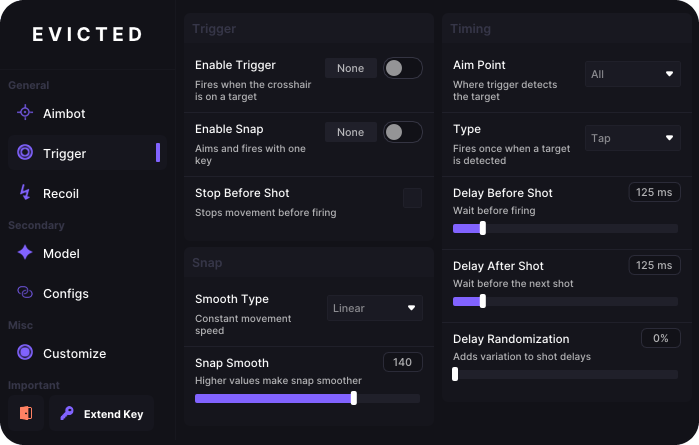
- ▸ Aim Point - Selects the body part the trigger should detect before firing.
- ▸ Delay After Shot - Controls how long the trigger waits before firing again.
- ▸ Delay Before Shot - Adds a pause between detecting an enemy and firing.
- ▸ Delay Randomization - Slightly changes firing delays so the timing is not identical every time.
- ▸ Enable Snap (ON/OFF) - Quickly moves the crosshair to an enemy and fires.
- ▸ Enable Trigger (ON/OFF) - Automatically fires when an enemy appears under the crosshair.
- ▸ Smooth Type - Selects how the crosshair moves toward the enemy during Snap aiming.
- ▸ Snap Smooth - Controls the speed and smoothness of Snap aiming.
- ▸ Stop Before Shot (ON/OFF) - Stops your character before firing to improve accuracy.
- ▸ Type - Selects how the automatic firing system should work.
- ▸ Activation Key - Assigns a key that activates the selected weapon preset.
- ▸ Create Preset - Creates a new weapon preset.
- ▸ CS2 Presets - Displays saved weapon presets for CS2.
- ▸ Delete Preset - Permanently deletes the selected weapon preset.
- ▸ Duplicate Preset - Creates a copy of the selected preset with all its settings.
- ▸ New Preset - Provides a field for entering the name of a new weapon preset.
Технические требования
Параметры системы для корректного запуска и стабильной работы сборки.
Игровой клиент
RUST (Steam / Официальный лаунчер)
Процессор
Intel & AMD
Система (ОС)
Windows 10/11
Режим окна
Безрамочный
Встроенный спуфер
Встроенный
USB-накопитель
Не требуется
Режим BIOS
UEFI (GPT)
Видеокарта
Nvidia & AMD
Формат диска
GPT / NTFS
Отзывы покупателей
Отзывов на этот товар пока нет. Будьте первым, кто поделится своим мнением!
Другие читы
Из того же каталога — с актуальным статусом и ценами.
.png)
.avif)
О покупке этого чита
Оплата и выдача проходят на стороне Digiseller. Ключ выдаётся автоматически сразу после оплаты — вместе с ним приходит инструкция по установке на русском и английском.
Выдача автоматическая, ответа оператора ждать не нужно. Если ключ по какой-то причине не пришёл — напишите в поддержку, ссылки есть на этой странице.
Пока сборка на обновлении, покупка закрывается автоматически. Большинство разработчиков учитывают простой в подписке, а поддержка поможет с заморозкой, заменой или настройкой.
Через Digiseller: карты РФ и зарубежные, СБП, криптовалюта и электронные кошельки.
Возврат рассматривается индивидуально на стороне платформы: обращение в поддержку не гарантирует автоматический возврат. Поэтому перед покупкой стоит сверить системные требования и статус сборки.
Всё о Evicted AI Aimbot
Evicted AI Aimbot для Rust — искусственный интеллект на страже вашего превосходства
Современные шутеры требуют не только быстрой реакции, но и технологического преимущества. Приватный софт Evicted AI Aimbot — это революционное решение, использующее компьютерное зрение (YOLOv5) для обнаружения противников. В отличие от традиционных читов, Evicted не читает и не изменяет память игры, поэтому он полностью невидим для античитов. Это универсальный инструмент, который работает в Rust, CS2 (включая FACEIT), Valorant, PUBG, Apex Legends, Warzone, Fortnite, Rainbow Six Siege, Roblox и любых других играх с человеческими персонажами.
Почему Evicted AI Aimbot — лучший выбор для Rust
- Полная необнаружимость: Аппаратный принцип работы и отсутствие взаимодействия с памятью игры исключают риск бана.
- Универсальность: Один софт для всех популярных шутеров — от тактических CS2 и Valorant до динамичных Fortnite и Warzone.
- Точный AI-аимбот: Автоматическое наведение на противников с настройкой плавности и радиуса обзора для естественной игры.
- Компьютерное зрение YOLOv5: Мгновенное распознавание целей даже в сложных условиях освещения и на дальних дистанциях.
- Поддержка Rust: Оптимизированная работа в Rust с учётом механики стрельбы и особенностей карты.
Технологическое превосходство в каждом матче
Evicted AI Aimbot создан для игроков, которые ценят безопасность и универсальность. Благодаря использованию искусственного интеллекта софт адаптируется под стиль игры пользователя, обеспечивая максимальную эффективность без подозрений со стороны античит-систем. Забудьте о необходимости покупать отдельный чит для каждой игры — Evicted работает везде, где есть человеческие персонажи.
Безопасность и простота использования
Магазин Industries Cheat предоставляет эксклюзивный доступ к Evicted AI Aimbot. Софт не требует сложной настройки, регулярно обновляется и поддерживается командой разработчиков. Вы получаете не просто чит для Rust, а универсальное технологическое решение для абсолютного превосходства в любом шутере.